

Stylify uses CSS-like selectors to generate optimized utility-first #css 💎. Created with ❤️ by @8machy. #stylifycss Discord chat 👉 discord.gg/NuJsk5SMDz 💬
The Internet
- Tweets 437
- Following 3
- Followers 985
- Likes 301





Pinned Tweet

Headless Components 🚀
Speed up your development with easily editable Copy&Paste, Headless Components 🚀
stylifycss.com/snippets/comp…
✅Forms
✅Buttons
✅Switches
✅Grids
✅Dialogs
✅A lot more
#stylifycss #css #webdesign #javascript #reactjs #vuejs #ux #code #coding #programming
1
2
7
4,644

Stylify retweeted

class 属性に "width:640px" などを書いて CSS を生成するライブラリ。production ではクラス名が2文字とかになるのでインラインスタイルより容量が減る / “Code your website faster with CSS-like utilities | Stylify CSS” htn.to/2tfWtwz4Z3
1
1
757
Stylify retweeted

After 26 years of CSS experience, I'll take the left every single time.
206
322
3,608
1,499,307
Stylify retweeted

1/3
Did you know that:
there is around 694 CSS properties you can use to style your website: Chrome, Mozila, Opera, Safari and Edge 🤯.
@stylifycss can use them all in the latest 0.6.2 🚀.
github.com/stylify/packages/…
#css #html #code
1
1
1
515
Stylify retweeted
1/2
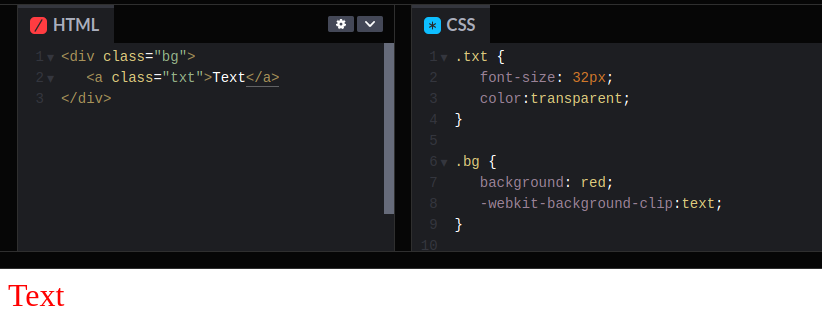
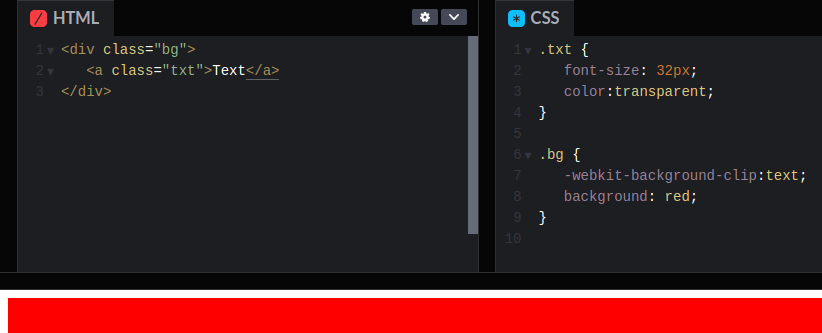
CSS background-clip:text tip👇
If you plan to use background-clip, then it must be set after the background-color. Otherwise it won't work. In this particular case, the order of properties is important.
Took me a while to debug it in @stylifycss.
#css #html #javascript #ui
1
1
1
590
Stylify 0.6.1 has just been released.
⚒️ Fixed broken types in stylify/unplugin
⚒️ Less invasive markup mangling
⚒️ Various bugs fixed
Release: github.com/stylify/packages/…
Web: stylifycss.com
#stylifycss #css #javascript #html
387
Stylify retweeted
3/3
"But these tools have a reason to exists."
"Nah, you can handle the reactivity and contextual escaping of variables on your own. It's just, months of work and a lot of lost hair." 😂
1
2
140
Stylify retweeted
2/3
The best to explain this to other devs is, that removing Talwind or @stylifycss is like if you remove @laravelphp, @symfony, @vuejs or @reactjs from the project, grab popcorn and then just sit and watch to see their pain while coding and optimizing everything from scratch😂
1
1
2
118
Stylify retweeted
1/3
It's hard to explain how useful Utility-First CSS is to someone, who work on small blog and never even tried them
I mean, pure CSS is always the best/most future-proof choice, but working with utility libraries like Tailwind or @stylifycss even on a blog can be a huge relief
1
1
2
205
Stylify retweeted

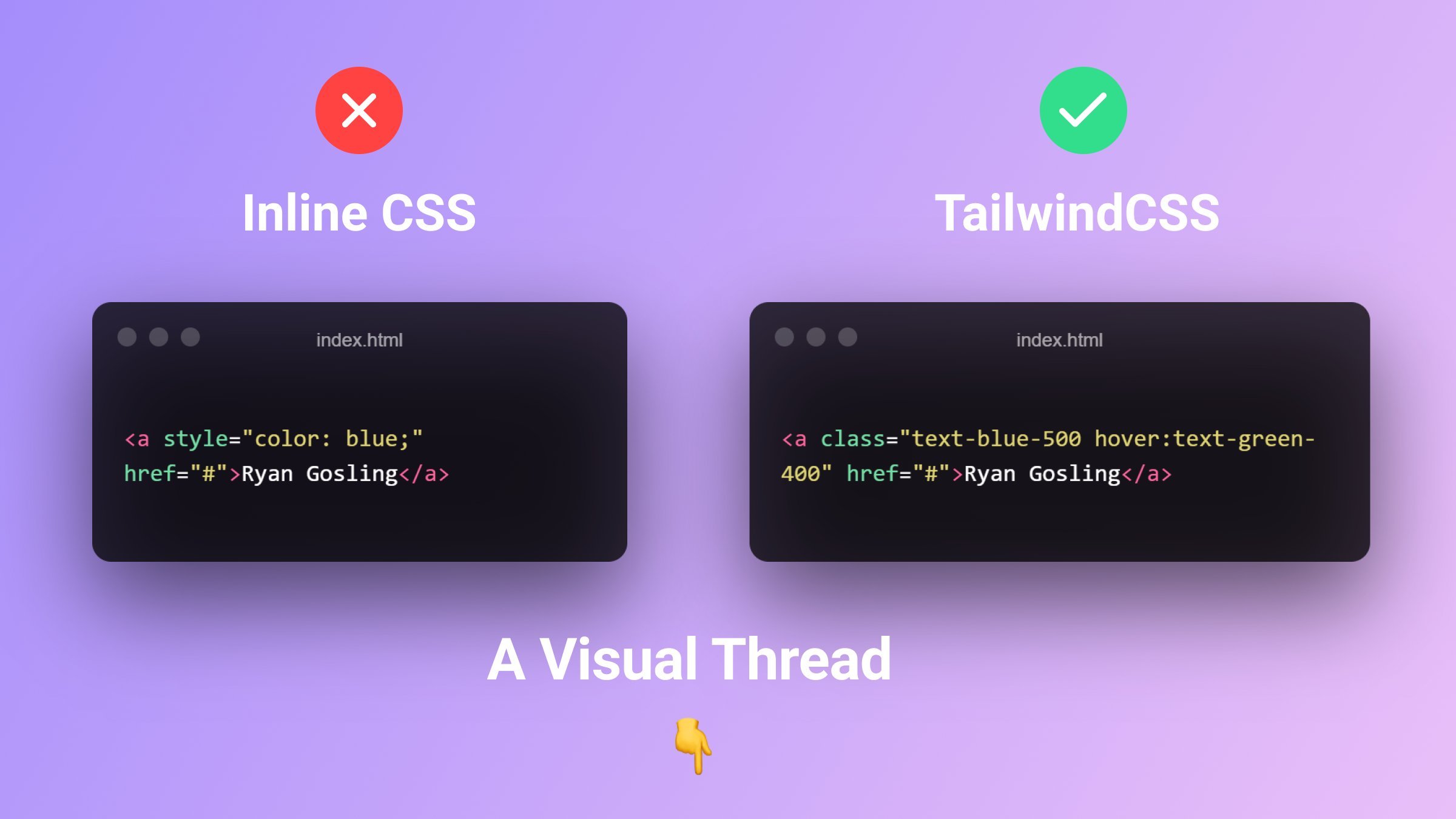
If you like inline styles you should have a look at @stylifycss
😉😇😅

"Tailwind CSS is just Inline styles"
I'm fed up of these comments 🤦♂️
So shut up and here is a visual comparison ↓
1
2
10
2,839
This version is already used on stylifycss.com 🚀.
And it seems that the 0.6.x versions could be a candidate for the first major release 1.0🤟
Now the 1.0 github.com/stylify/packages/…
Any ideas what to add/improve?
#stylifycss #code #css #html #javascript #react #vuejs
2
149
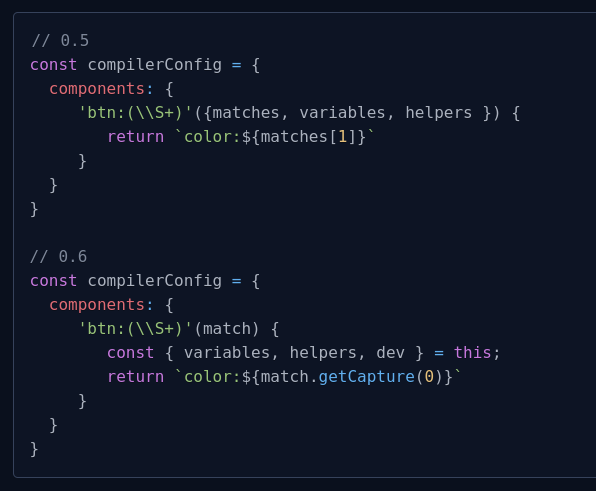
(3/4)
Macros, components, helpers now receive compiler instance as the this object. It simplifies the usage of configured helpers, variables and others
#stylifycss #code #css #html #javascript
1
1
104
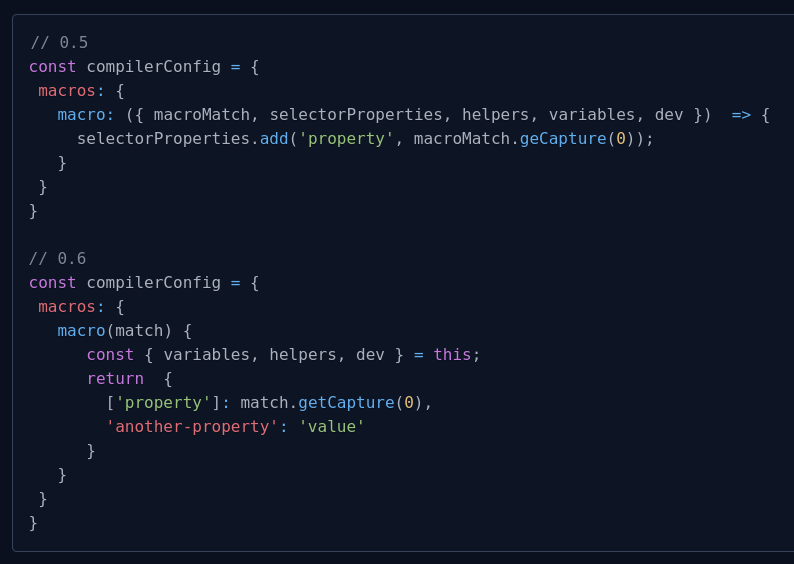
(2/4)
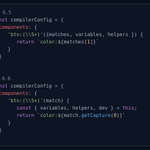
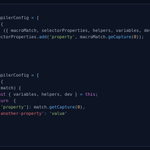
Macros configuration is now simplified. Just return an object of new properties
#stylifycss #code #css #html #javascript
1
1
35
(1/4)
Stylify 0.6 has just been released 🎉
👉 stylifycss.com/en/docs/get-s…
✅CSS variables enabled by default
✅Easier and united configuration for utilities, components, and custom selectors
✅Perf improvements
✅More intuitive mangling configuration
#stylifycss #code #javascript
1
1
1
527
Stylify retweeted
Bundling production build for @stylifycss monorepo:
🔥 @oven_sh => 0.4-0.8 s
Node.js => 28-30 s
Build and watch works fine with (using ESbuild).
Seems only Jest has some problems because of some async operations.
#stylifycss #bunjs #css #code #javascript #webdev
1
2
4
665
Stylify got mentioned in @ahrefs blog post by @JoshuaCHardwick about Twitter Brand profiles case study.
👉 Check it out ahrefs.com/blog/saas-twitter…
Have a brand? CREATE A HASHTAG FOR IT 🤟.
#stylifycss #ahrefs #seo #webdev #Marketing
1
173
Stylify retweeted

Faster Styling for React Apps: How to Migrate from Emotion CSS-in-JS to Stylify Utility-First CSS by @8machy javascriptkicks.com/r/595455… #javascript via @JavaScriptKicks
3
6
1,696
Stylify retweeted

Faster Styling for React Apps: How to Migrate from Emotion CSS-in-JS to Stylify Utility-First CSS: javascript.plainenglish.io/f… #
3
17
1,495
Stylify retweeted
Are you looking for a CSS framework to learn during #100DaysOfCode? The one without much studying?
👉Check out stylifycss.com
✅Zero learning curve
✅CSS-like selectors, no shortcuts, stay with CSS
✅Less switching between HTML&CSS files
✅Extremely small output
#css
2
2
422