

JavaScript diagramming library powering exceptional UIs
Prague, Czechia
- Tweets 439
- Following 106
- Followers 560
- Likes 48












How to list ports in a stencil and allow users to drag them into elements, change their position or remove them? ➡️ bit.ly/3J2XtBP
1
93
It's Wednesday again and we all know what that means: a brand new demo 📢
This time we decided to delight the crypto community and created a UML class diagram visualizing the #Blockchain data model.
jointjs.com/demos/uml-class-…
2
3
174
Just like the sun rises every morning, you can count on the JointJS team to present a new demo every Wednesday!
Today, we'll shine a light on how to style a diagram in CSS and switch between light and dark diagram modes ➡️ bit.ly/3KaXc0L
2
113
We are witnessing a revolution in search and the way people get information from the web. #ChatGPT by
@OpenAI has taken the world by storm in recent weeks, introducing groundbreaking #AI technology.
Let's see how it all started (interactive timeline).
jointjs.com/demos/chatgpt-ti…
3
7
30
20,641
Another Wednesday, another showcase of our diagramming library. This time we'll look at a handy feature: callouts 💬
If you want to annotate diagram elements with various callouts (rectangle or oval balloon, thought, brace), this demo is for you ➡️ bit.ly/3JA0j1V
2
87
Today's demo is for fans of UML diagrams 👇
How to use the built-in standard.Record shape to create a UML class? How to configure the Inspector plugin to be split into tabs and be able to change attributes and methods of a UML class at a granular level?
bit.ly/3RcvO44
1
1
97
Today's special demo is for the #NodeJS crew 😎
The NodeJS promoters at JointJS put together an interactive demo showcasing the timeline of this back-end framework.
Check it out 👉 bit.ly/3ko3QpJ
1
2
11
39,516
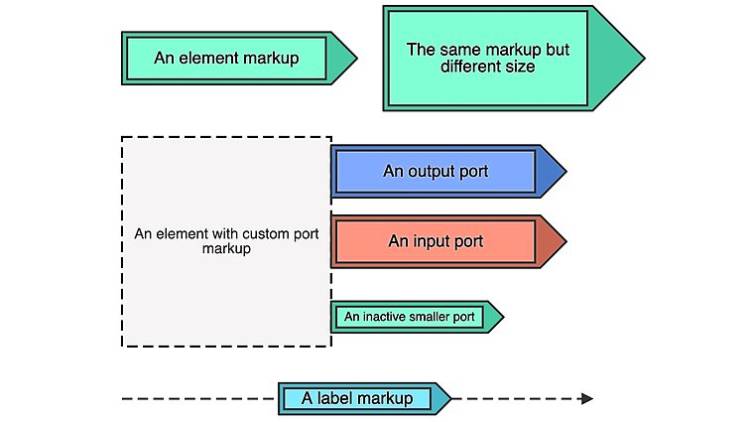
You probably know that you can style your JointJS elements in many ways by providing your own SVG markup. But did you know that you can use the same custom markup not only to define elements but also ports or link labels? Have a look at this example ➡️ bit.ly/3Xkdesv
1
109
Are you looking for a way to represent stencil elements in a way other than their actual appearance in the diagram? Check out this demo that shows a different representation of elements during the drag-n-drop sequence➡️ bit.ly/3jJbSJf
#dataviz
119
📢 Demo Wednesday
Wondering how to use external SVG images as or within JointJS shapes? Today's demo shows three different ways to approach this ➡️ bit.ly/3Gp3oQC
73
Farewell to 2022, warm welcome to 2023 👋
We wish everyone good luck, time spent with loved ones, and health and energy for the year to come. May 2023 be a peaceful year, full of respect for others and the courage to pursue ideas with positive impact.

2
5
141
📢 Demo Wednesday
Want to enable a special mode where users can only post comments? They could only add or delete comments, but not interfere with the structure of the diagram. Take a look at this demo ➡️ bit.ly/3iQTtd1
75
How to create a tree graph with add buttons? What if the buttons are just JointJS elements? How would you configure the TreeLayoutView to prevent the user from dropping nodes after the add buttons? Take a look at this demo ➡️ bit.ly/3hsIHcL
📢 Demo Wednesday
Do you want users to be able to upload an image directly into the stencil? Drag and drop a stencil element into a diagram and be able to view the original image in the LightBox? See how to do it with JointJS+ ➡️ bit.ly/3iGxgyk
📢 Demo Wednesday
How to automatically place element labels based on the available space around them? How to enable the user to select the preferred position of the label? Take a look at our new demo ➡️ bit.ly/3Hf9YKn
📣 Demo Wednesday
Today's demo shows how to maintain a tree with automatic tree layout, and also how to allow users to add special backlinks that may create cycles but are not taken into account by automatic layout ➡️ bit.ly/3EyARFQ
Do you need to switch a diagram from read-only to completely editable mode? Do you need to make it dynamic, e.g. based on user permissions? Here is a CodePen of how to structure your application to make toggling between view and edit mode easier ➡️ bit.ly/3TJzFFp
Do you want to animate elements in a diagram? You can write a custom element view and take advantage of the fact that JointJS shapes are made up of SVG, which can be set in motion using the Web Animation API.
1
1
Do you want the elements in the diagram to form a circle or rectangle? Do you want the position of the elements to be automatically calculated based on the number of elements?
Circular Layout ➡️ bit.ly/3WlOwIx
Rectangular Layout ➡️ bit.ly/3FEVRgA
1
⚡ Today we are happy to introduce the most powerful version of JointJS+ yet!
With 3.6, we bring significant improvements to the UI diagramming components, making the interaction with your application even more enjoyable for the customer.
Read more 👇
bit.ly/3zcVcP4
7
80